


Air Tag Detector: Find & Track
4.5241.00 Reviews
App Specs
- Version
- 3.4
- Updated On
- License
- Free
- Downloads
- 100,000+
- Developer
- MONIQ TAP., CO LTD
- Categories
- Tools
- Platform
- Android
Screenshots
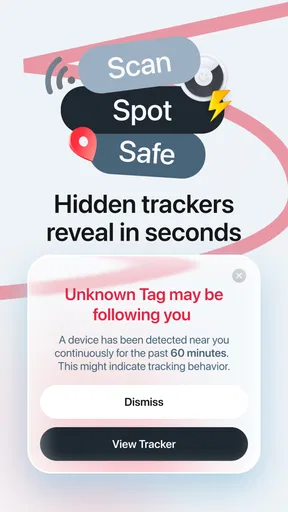
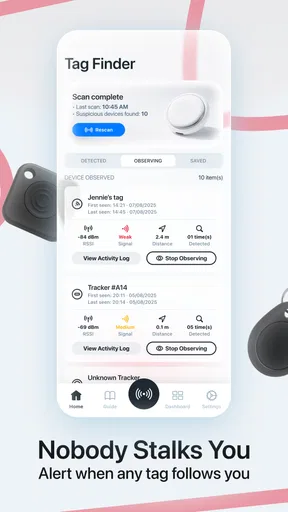
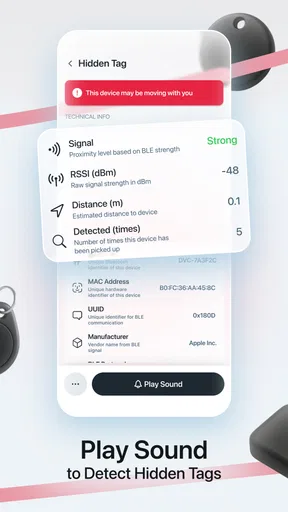
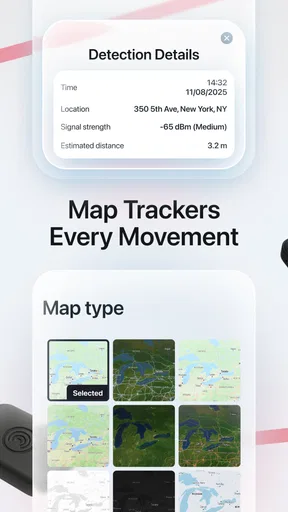
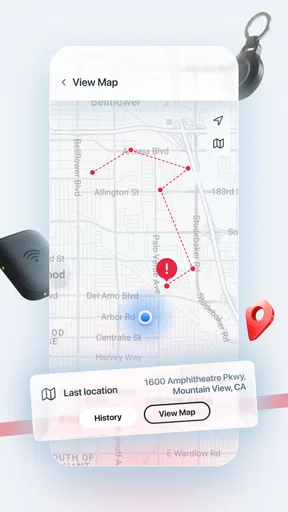
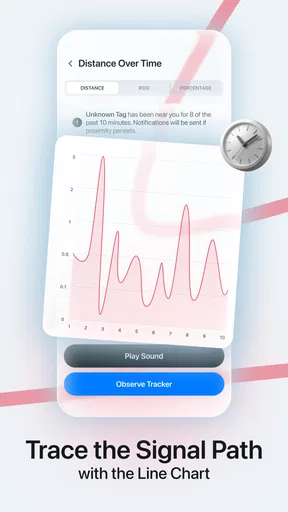
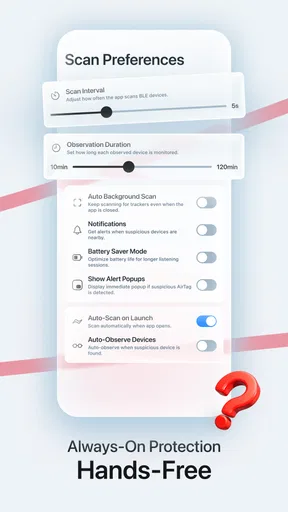
 Analysis by AppCompare
I approached Air Tag Detector: Find & Track as a practical privacy tool rather than something I would leave open for entertainment. Its purpose is straightforward: help me check whether an unknown AirTag may be traveling with me. That makes it relevant in situations where a small tracker could be hidden in a bag, attached to a vehicle, or left among personal belongings without my knowledge.
The app comes from MONIQ TAP., CO LTD and sits in the tools category. It is free to install, rated for Everyone, and currently listed at version 3.4. The overall impression is accessible: I do not need specialist knowledge to understand why I might use it. The more important question is whether a dedicated detector adds enough value over the tracking alerts already built into a phone, and that depends heavily on how I travel, what devices I use, and how much control I want during a manual check.
How I Decide Whether an AirTag Detector Is Worth Using
The first thing I consider is the type of risk I am trying to manage. There is a difference between receiving an automatic warning after an unfamiliar tracker appears to move with me and deliberately checking a room, car, suitcase, or borrowed item. A detector app is most useful in the second situation. It gives the idea of a privacy inspection a clear place in my routine instead of relying entirely on an alert that may arrive later.
I also look at whether the app suits my phone and habits. This Android app requires Android 8.0 or later, so it is available to people using many older phones as well as newer models. That broad compatibility matters when someone is borrowing a family member’s device for a check or using an older spare phone. I would still treat compatibility as a starting point, not proof that every handset will behave exactly the same way in every environment.
Another decision criterion is clarity. A privacy tool should help me understand what it has found, what action I can take, and what remains uncertain. A scan result is not automatically proof of malicious intent. An AirTag may belong to a partner, a family member, a colleague, or the owner of a vehicle I am using. The useful outcome is a better-informed next step, not immediate panic.
That is why I prefer using this kind of app as part of a short, repeatable workflow. I can check my belongings in a quiet place, repeat the scan after moving away from familiar devices, and investigate anything that continues to appear unexpectedly. This is more sensible than opening the detector every few minutes or assuming that one clean result guarantees complete privacy.
What I Would Check Before Starting a Scan
I would begin by separating my own accessories from the items I want to inspect. If I carry a tracker for keys, luggage, or another personal item, I want to know where it is before interpreting a result. The same applies to a companion’s belongings. This simple preparation reduces false alarms and makes the app’s findings easier to judge.
Worth Reading Before You Choose

EA SPORTS FC Mobile 26 Is a Bigger Football Game, but It Takes Time

Flipboard Shows What News Apps Must Do Beyond the Feed

Switching to Android Auto Means Rethinking Your Driving Routine

Google Calendar Makes a Crowded Week Easier to Manage

Ludo King Makes the Most of the Minutes Between Plans

Baby Panda World Brings Quick Play to Modern Phones, but Its Game Library Feels Busy
I would then choose a location that is not crowded with unfamiliar Bluetooth devices. A busy station, airport, hotel lobby, or shared office can make any nearby-device check harder to interpret. That does not make the app useless in those places, but it changes how confidently I would read the result. For a more meaningful check, I would scan again in a calmer environment and compare what remains visible.
A particularly useful habit is to inspect the object I am actually concerned about rather than scanning only from across a room. If I am worried about a suitcase, I would check the suitcase and its compartments. If I am worried about a car, I would examine the places where a small item could reasonably be concealed. The app can support the electronic part of the search, but it cannot replace looking carefully at the physical object.
The strongest result comes from combining a scan with sensible physical checking. That is an important distinction because a detector is not a magic wand. It can help point my attention in a direction, but it cannot establish who placed a tracker there or why.
Why the Dedicated Approach Can Be Reassuring
What I like about a dedicated privacy tool is the intentionality. Instead of waiting for a background notification, I can decide that now is the right time to check. That is especially helpful after using a rideshare, staying in unfamiliar accommodation, borrowing equipment, or leaving personal items somewhere outside my normal routine.
There is also a psychological benefit to having a clear check available. Privacy concerns often become vague and stressful when I do not know what action to take. A focused detector gives me a practical first step. Even when the result is ordinary, the process can help me feel that I have examined the situation rather than simply hoped nothing was wrong.
At the same time, I would not treat a dedicated app as a replacement for the safety features built into the phone’s operating system. Those system-level tools may be better positioned to provide background awareness, while an app like this is more naturally suited to an on-demand inspection. In my view, the two approaches serve different moments rather than competing perfectly.
Where Air Tag Detector: Find & Track Fits Best
The app’s clearest strength is its narrow focus. It is not trying to be a general file manager, battery utility, or broad security suite. Its identity is tied to unknown AirTag tracking, which makes the reason for opening it easy to understand. For a person who wants a dedicated check instead of navigating through several unrelated settings, that focus is valuable.
I can see it being particularly useful for Android users who spend time around Apple tracking accessories but do not use an iPhone. The app gives them a privacy-oriented tool in the environment they already use. That does not mean it should be considered a complete answer to every form of unwanted tracking; it means it addresses a specific concern in a direct way.
It also makes sense for occasional, high-attention situations. Imagine returning from a weekend trip and noticing that a bag has spent time out of your sight. Before unpacking, I could place the bag in a quiet area, run a check, and then inspect its pockets, lining, and attached accessories. If something unexpected remains associated with the bag, I have a reason to investigate further rather than dismissing the feeling.
Another realistic scenario is borrowing a car from a friend or using a vehicle that has recently changed hands. I would not assume that every unfamiliar signal means someone is monitoring me, because the vehicle may contain a legitimate tracker belonging to its owner. Still, a scan can prompt a calm conversation and a physical inspection. The app is useful here because it helps turn a vague concern into a specific question.
Three Practical Habits That Improve the Experience
First, I would repeat a suspicious check after changing location. A device that appears once in a crowded place may simply be nearby. If the same concern follows the particular bag, car, or personal item, that pattern deserves more attention than a single observation. Repeating the process is not about chasing a perfect technical certainty; it is about collecting context.
Second, I would record the circumstances of a concerning result. I might note which item was nearby, where I was standing, and whether the signal appeared before or after moving away from other people. This small amount of organization helps me avoid mixing up a tracker in my own luggage with one near someone else. It also gives me a clearer account if I need to ask the owner of an item for an explanation.
Third, I would scan before and after handing off important belongings. For example, if I lend a suitcase or camera bag to someone and later receive it back, a quick check can become part of my return routine. The same idea applies to second-hand items, borrowed sports equipment, or a vehicle used by multiple people. This is a more useful pattern than scanning randomly without a specific reason.
These habits are not extra features that I would claim the app performs automatically. They are ways I would use a focused detector more intelligently. The app provides the check; I provide the context and judgment.
What the User Experience Means in Practice
A free entry point lowers the barrier to trying the app. I can install it without making an immediate purchase decision, which is appropriate for a privacy tool that some people may need only occasionally. The current version is 3.4, and the app has passed the early stage of being an unknown experiment for many users, with over one hundred thousand installs and an average rating of 4.5 from around six and a half thousand ratings.
Those figures suggest that the app has attracted meaningful interest, but I would not use popularity as a substitute for personal testing. Detection tools are sensitive to the phone, surroundings, and situation. A positive reputation tells me that many people found enough value to rate it well; it does not remove the need to interpret results carefully on my own device.
The Everyone age rating is also fitting for the subject. Privacy awareness is relevant to ordinary households, travelers, students, and workers, not just technical users. I would still explain the results to a younger person before they act on them, because discovering an unfamiliar tracker can lead to emotional or interpersonal consequences that a simple scan cannot resolve.
Where Other Options May Fit Better
The usual alternatives fall into several categories. The first is the operating system’s built-in unwanted-tracker alerts. These are attractive because they can work in the background and do not require me to remember to open a separate app. If my main concern is ongoing awareness during daily life, a system feature may be the better first line of defense.
The trade-off is control. A background alert is convenient, but it is not the same as deciding to inspect a particular bag or room at a particular moment. A dedicated detector can feel more direct when I have a concrete reason to check. I would use the system protection for passive awareness and this app for deliberate inspections, assuming both are available and behaving as expected on my phone.
The second alternative is a general Bluetooth scanner. Such tools can be useful for people who want to inspect a wide range of nearby devices, troubleshoot accessories, or understand their local wireless environment. However, they may produce a less focused experience for someone whose only concern is an unknown AirTag. A broad scanner can expose more technical detail while leaving the user to decide what matters.
That broader approach is better for technically confident users who enjoy investigating device identifiers and signal behavior. It is less appealing to someone who wants a privacy check that stays centered on a specific type of tracker. I would choose the general scanner only when I had a reason to investigate beyond AirTags.
The third alternative is a physical search without an app. This remains essential. A careful inspection can reveal an object that a wireless check does not make obvious, especially when the problem is not an AirTag or when the device is placed somewhere difficult to reach. If I am checking a car, luggage, or furniture, I would never stop at the phone screen.
There is also a human alternative: asking the owner of a shared item whether it contains a legitimate tracker. That conversation may be more effective than a technical result when the item belongs to a family member, employer, rental company, or friend. The app can help me ask a precise question, but it cannot determine intent or ownership by itself.
When I Would Skip This App
I would skip it if I wanted a complete anti-surveillance system covering every possible tracking technology. The app’s focus is AirTag detection, so someone worried about cellular trackers, GPS devices, unknown accounts, or other forms of monitoring needs a much broader plan. Installing one focused tool and assuming all privacy risks are covered would create false confidence.
I would also hesitate if my main need were effortless, continuous monitoring. A manually opened app depends on my remembering to use it and on my choosing sensible moments for a scan. A built-in alert system may fit better for someone who travels constantly and wants the phone to notify them without a separate routine.
Finally, I would not recommend relying on it as the sole response to a frightening discovery. If I found a tracker in a personal item and believed I was in immediate danger, I would prioritize personal safety, preserve the item and relevant details, and seek help from a trusted person or appropriate local authority. A detector is a tool for information, not an emergency service.
Free Access, Optional Spending, and the Cost of Switching
The app is free to install, which makes trying its basic approach relatively easy. There are in-app purchases ranging from $1.99 to $34.99 per item, so I would pay close attention to what is offered before confirming anything. For occasional use, I would first decide whether the free experience already covers my needs. A privacy tool should earn an upgrade through clear practical value, not through pressure created by anxiety.
This pricing structure also affects how I compare it with alternatives. A built-in phone feature may feel cheaper because it is already part of the device experience, while a general scanner may offer a different balance of technical detail and cost. I would compare the actual workflow I need rather than choosing solely by the presence of a free download.
The cost of switching is not only monetary. If I move from this app to a system alert, I may lose the habit of performing a deliberate manual check. If I move to a broad scanner, I may gain more information but spend more time interpreting it. If I rely only on physical searches, I may avoid app-related friction but lose a convenient electronic clue.
For that reason, I would not uninstall one approach immediately after trying another. I would test them in the same kind of situation and compare how clearly each one helps me decide what to do next. In privacy work, the best tool is often the one I will actually remember to use and understand when the result appears.
Questions I Would Ask Before Installing
Would this help me if I use Android? Yes, that is the audience it is designed to serve, provided the phone runs Android 8.0 or later. I would still perform a real test in a controlled situation rather than assuming that compatibility alone guarantees an identical experience across every handset.
Can it tell me whether a tracker is dangerous? No detector should be treated as a mind-reader. A result can identify a reason to investigate, but ownership, consent, and intent require context. I would compare the result with my belongings, the people around me, and the history of the item being checked.
Should I use it instead of built-in phone alerts? I would not frame that as an either-or decision. Built-in alerts are useful for passive awareness, while a dedicated app is more relevant when I want to initiate a focused check. Using the right method for the right situation is more sensible than expecting one tool to do everything.
What should I do after an unexpected result? I would move to a safe, calm place, repeat the check away from crowded surroundings, inspect the relevant item, and ask trusted people for help if the concern remains. I would avoid confronting someone based only on an ambiguous scan. The app can support a careful response, but the response still needs human judgment.
Is paying worthwhile? I would start with the free version and identify the exact limitation that a purchase would solve. If I only check a suitcase before travel or inspect a borrowed vehicle once in a while, an upgrade may not be necessary. If the paid option clearly improves a repeated privacy workflow, I would weigh that benefit against the available alternatives before spending.
My Recommendation for Different Kinds of Users
I recommend Air Tag Detector: Find & Track to Android users who want a focused, on-demand way to investigate possible AirTag tracking. It is especially suitable for travelers, people who regularly borrow or share vehicles, and anyone who wants a clear manual privacy check alongside the phone’s normal protections. The free installation makes it reasonable to try without committing to a purchase.
I would recommend a combined approach for the most cautious users: keep ordinary system alerts enabled, use this app when there is a specific item or situation to inspect, and always follow up with a physical search. That workflow respects the strengths of each category without asking one detector to cover every kind of threat.
I would not recommend it as the only privacy measure for someone facing a serious stalking concern or looking for detection of every tracking technology. In that case, broader technical advice and personal safety support matter more than any single app. I would also steer highly technical users toward a general scanner when they need detailed investigation beyond AirTags.
My final view is positive but measured. The app makes a narrow concern easier to act on, and its focused purpose is more useful than a vague promise of total security. Its real value appears when I use it deliberately, repeat checks when the context calls for it, and treat results as clues rather than verdicts. If that matches the way you want to protect your privacy, this is a practical tool to keep available for focused checks. If you want invisible, all-day monitoring or a complete anti-tracking suite, another category of solution will fit you better.
Pros
- Quickly scans nearby Bluetooth devices for possible trackers.
- Simple interface makes basic scans easy for most users.
- Can help identify unfamiliar tracking devices in public places.
- Useful for checking luggage
- cars
- hotel rooms
- and personal belongings.
- Provides an extra privacy check alongside Apple’s built-in alerts.
Cons
- Detection results may include harmless Bluetooth devices and require verification.
- Cannot guarantee that every hidden tracker will be detected.
- Some features may require in-app purchases or subscriptions.
- Bluetooth scanning can increase battery consumption during repeated checks.
- Effectiveness depends on device permissions and the tracker’s signal strength.
FAQs for Air Tag Detector: Find & Track
What is Air Tag Detector: Find & Track used for?
Air Tag Detector: Find & Track is designed to help identify unknown Bluetooth trackers, particularly AirTag-style devices, that may be traveling with you. After scanning nearby Bluetooth signals, the app can display potentially suspicious trackers and provide information to help you investigate them. It is intended as a personal safety and awareness tool, not as a guaranteed method for detecting every tracking device or locating a tracker with absolute precision.
How does the app detect an unknown AirTag or Bluetooth tracker?
The app generally relies on Bluetooth scanning to search for nearby compatible tracking devices. For the scan to work properly, Bluetooth and location-related permissions may need to be enabled, and you should move around the area while scanning. Detection can depend on the tracker being within range, powered on, and discoverable. Walls, distance, interference, and the tracker’s settings may affect the results.
Can Air Tag Detector: Find & Track locate any hidden tracking device?
No detection app can promise to find every hidden tracker. Air Tag Detector: Find & Track is primarily intended for compatible Bluetooth-based devices, so it may not detect GPS trackers, cellular devices, disabled trackers, or products using technologies the app does not support. A scan result should be treated as an indication requiring further investigation rather than definitive proof that a person or object is being tracked.
What permissions does the app require, and are they safe to grant?
Depending on your device and operating system, the app may request access to Bluetooth, nearby devices, location services, and notifications. These permissions are commonly required for scanning and alert features. Before accepting, review the permission explanations and the app’s privacy policy in the relevant app store. You can also revoke permissions later through Android or iOS settings, although doing so may limit scanning functionality.
Is Air Tag Detector: Find & Track free to download and use?
The app may be available to download at no initial cost, but some functions can depend on advertising, in-app purchases, subscriptions, or usage limits. The exact pricing and available features may vary by platform, country, and app version. Check the Google Play Store or Apple App Store listing before installing, paying particular attention to trial periods, recurring subscription terms, and cancellation instructions.


